Introduction
If you're like most people, you use your Instagram account to share awesome memes, selfies, unforgettable moments, and mouthwatering recipes with your family and friends. One common curiosity that crosses many minds: How to see who unfollowed you on Instagram? When you have around 150 Instagram followers, it's relatively manageable to keep track of your followers and monitor your follower count.
However, if you're leveraging Instagram to build an online presence or business, having a substantial and growing follower list becomes crucial. Witnessing an increase in your Instagram unfollowers can be a bit stressful. While manually checking unfollowers is doable (though tedious), it becomes nearly impossible to manage when you have thousands of followers. If you've ever pondered the question of How to see who unfollowed you on Instagram, you're in the right place. We're here to guide you on the best methods to stay informed about your Instagram followers, regardless of your following size.
Why Track Instagram Unfollowers?
Understanding who unfollows you on Instagram is essential for maintaining and growing your online presence. It helps you:
- Identify content that may not resonate with your audience.
- Understand your follower demographics better.
- Adjust your strategy to improve engagement and retention.
How to see who unfollowed you on Instagram (Manual Methods)
Checking Individual Profiles
If you ever find yourself pondering the question, 'Who unfollowed me on Instagram,' and you're specifically curious about an individual, one way to manually check is by visiting their Instagram profile. Navigate to their profile and tap on the 'Following' box. Here, you'll find a list of accounts they follow. If you were once among them but no longer appear on the list, you can reasonably assume you've been unfollowed.
Sounds straightforward, doesn't it? However, this manual method becomes impractical when dealing with a substantial following in the thousands.
Practical for Smaller Followings
For those with fewer followers, manually checking might be feasible. This method is:
- Accurate: You get first-hand confirmation of who unfollowed you.
- Immediate: No need to wait for app updates or data processing.
How to see who unfollowed you on Instagram Using Apps or Websites
In 2018, Instagram made an important change to secure your data. As a result, many third-party apps for discovering Instagram stats stopped working. However, some apps have adapted and continue to offer reliable services.
Finding the Right App
When choosing an app to track unfollowers, consider:
- Security: Ensure the app does not require your Instagram login or password.
- User Reviews: Check for positive feedback from other users.
- Features: Look for apps that offer comprehensive tracking and additional insights.
Secure Process with Unfollowers Tracker
How Unfollowers Tracker Works
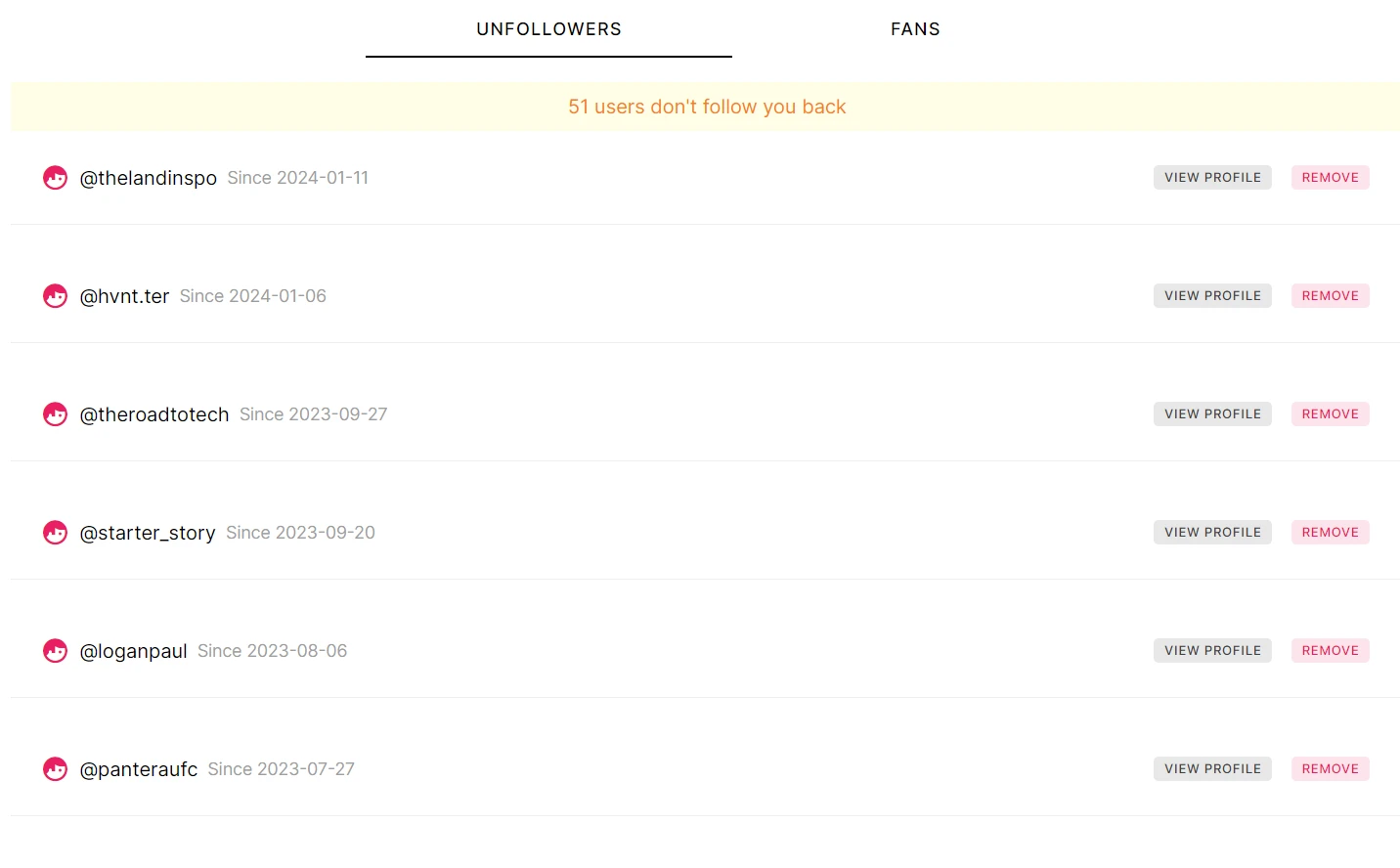
Unfollowers Tracker is a reliable website that helps you monitor who unfollows you without compromising your account security. Here's how it works:
- Download Your Instagram Data: Request a ZIP file from Instagram containing your followers and following data.
- Upload to Unfollowers Tracker: Use this file to generate lists of unfollowers and fans.
Benefits of Unfollowers Tracker
- No Passwords Required: Ensures your account remains secure.
- User-Friendly Interface: Easy to navigate and manage your followers.
- Detailed Insights: Provides comprehensive lists of unfollowers and fans.
Unfollowers Tracker
On this website, all you have to do is upload the ZIP file requested from Instagram containing your followers and following data. The website will then generate lists of unfollowers and fans. You can effortlessly navigate through these lists, clicking on each profile to be redirected to their Instagram profiles. This provides a secure way for you to manage your followers, allowing you to follow or unfollow users with ease. Try the tool here: Unfollowers Tracker Website
Requesting Your Instagram Data
To use Unfollowers Tracker, you need to download your Instagram data. Follow these steps:
Step-by-Step Guide to Download Instagram Data
- Go to your Instagram app.
- Navigate to your profile.
- Click on the top right menu.
- Select “Your Activity.”
- Scroll to the bottom and choose “Download Your Information.”
- Click on “Request a Download.”
- Select your account (if you have multiple linked accounts).
- Choose the "Select types of information" option.
- Scroll to the "Connections section" and select “Followers and Following.”
- In the "Format" option, select “JSON.”
- In the "Date Range," choose “All Time.”
- Click on "Submit Request."
You will receive the ZIP file in your email, which you need to upload to Unfollowers Tracker. You can follow this guide which explains step-by-step all the whole process on this video: Unfollowers Tracker Tutorial
Understanding Unfollowers Tracker
Unfollowers Tracker simplifies the process of managing your followers. The website generates lists of unfollowers and fans, allowing you to follow or unfollow users effortlessly. It provides a secure way to manage your Instagram followers without risking your account's safety.
Benefits of Using Unfollowers Tracker
- Efficiency: Saves time by automating the process of tracking unfollowers.
- Security: No need to share your Instagram login details.
- Convenience: Easy to use with a straightforward interface.
Conclusion
Monitoring your Instagram followers is crucial, but the real key to success lies in cultivating growth through compelling content. Dive into our comprehensive guide for invaluable insights and discover the most effective strategies to boost your presence on Instagram. Unlock the secrets to organic growth and take your Instagram journey to new heights. Explore the full guide: How to Grow on Instagram.
Frequently Asked Questions (FAQs)
How can I see who unfollowed me on Instagram?
You can manually check individual profiles or use a website like Unfollowers Tracker for a more efficient method.
Is it safe to use third-party apps to track unfollowers?
Yes, as long as the app does not require your Instagram login or password and has good user reviews.
How do I download my Instagram data?
Go to your profile, select “Your Activity,” and follow the steps to request your data download.
Can I prevent people from unfollowing me?
While you can't prevent unfollows, you can reduce them by creating engaging content and interacting with your followers.
What are the risks of using third-party apps?
Risks include data privacy issues, account security breaches, and potential bans from Instagram.
What should I do if my unfollow rate is high?
Evaluate your content, seek feedback from your audience, and adjust your strategy accordingly.